
Task types help you structure and differentiate the tasks you create in Cerivo.
In most organizations, tasks cover a wide range of activities, such as:
- vendor audits
- data deletion
- risk assessments
- documentation updates
Task types group these activities so you can stay organized and maintain a clear overview.
Why task types matter
Without structure, tasks can become difficult to navigate and manage.
Task types help you:
- group similar work
- filter and find tasks quickly
- track specific types of activities over time
- improve reporting and oversight
Where task types are used
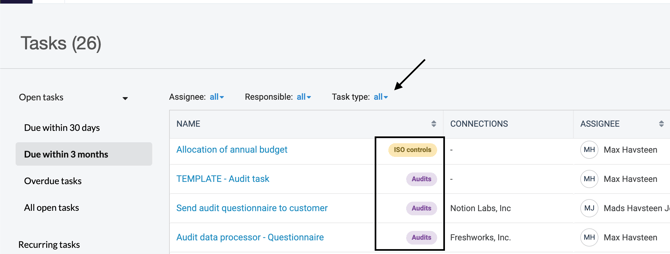
Task types appear as colored labels on each task.
You can also use them in the task overview to filter and focus on specific types of work.
How many task types can you have?
You can create up to 45 task types.
You can add or edit task types at any time in Settings.
Examples of task types
Here are some common examples to help you get started:
Vendor audit
Recurring tasks to review and audit vendors.
Ad hoc
One-off tasks that don’t fit into a recurring structure.
Controls
Tasks related to governance frameworks (e.g. ISO controls, CIS controls).
Risk assessments
Recurring tasks to review or update risk assessments.
Risk mitigation
Tasks focused on addressing identified risks.
Document maintenance
Recurring tasks to review and update documentation, such as policies or procedures.
Processing Activities
Tasks related to maintaining or updating Processing Activities.
Deletion
Recurring tasks to ensure personal data is deleted or reviewed according to policy.
Any questions? Contact us at support@cerivo.com!