
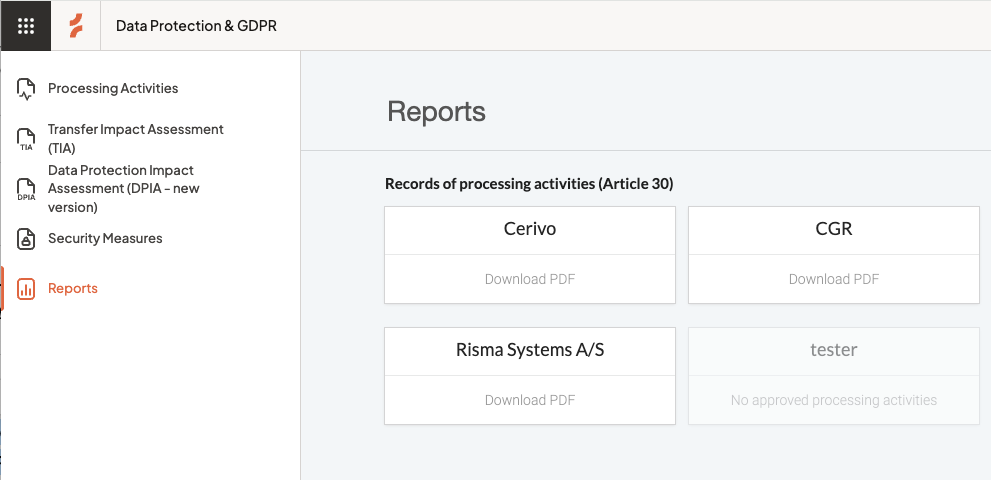
To download your Record of Processing Activities:
- Go to Data protection & GDPR in the left-hand menu
- Select Reports
- Choose the Record of processing activity to Download PDF
Note:
A Processing Activity must be approved to be included in your RoPA (Article 30 report).
Approval helps ensure that only reviewed and complete activities are part of your official record.
How to use approvals
How you use approvals in Cerivo is flexible.
You can adapt the approval status to fit how your organization works.
For example, you can use it to:
- confirm managerial review before inclusion in the RoPA
- track whether a Processing Activity has been reviewed this year
- manage a final check before exporting your report
In many cases, a responsible person reviews and approves Processing Activities once they are complete.
This ensures your RoPA reflects accurate and up-to-date information.
Read more about approving processing activities in Cerivo.
What’s included in the report
Only approved Processing Activities are included in the Article 30 report.
This ensures your report reflects reviewed and finalized information.
Export all Processing Activities
If you need a full overview — including both approved and unapproved activities — you can export this directly from the Processing Activities module.

Any questions? Contact us at support@cerivo.com!