
Why mapping third-country transfers matters
If personal data is transferred outside the EU/EEA, you must ensure the transfer complies with GDPR.
Mapping third-country transfers helps you:
- identify where data is transferred
- document the legal basis for those transfers
- ensure appropriate safeguards are in place
This information is included in your Record of Processing Activities (RoPA), supporting your compliance documentation.
Where to map transfers
In Cerivo, third-country transfers are mapped through your vendors.
This reflects how data is typically shared — with external parties and their sub-processors.
How to map a transfer
To map a third-country transfer:
- Open a vendor
- Go to the Locations tab
- Add a location
Enter:
- address (if relevant)
- city and country
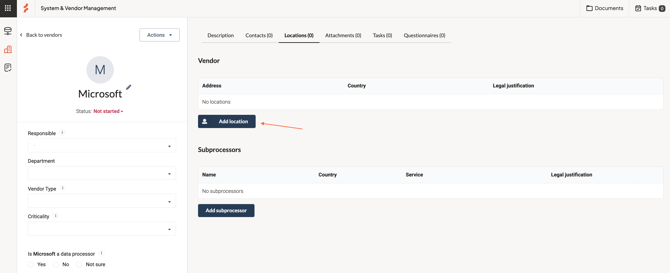
If the country is outside the EU/EEA, you’ll be asked:
Is personal data transferred to this location?
If yes, you must select at least one legal transfer mechanism.
Mapping sub-processors
You can also map transfers to sub-processors.
This works in a similar way, with additional details such as:
- the sub-processor
- the purpose of the transfer
Note: This feature may depend on your plan.
Legal transfer mechanisms
When transferring data outside the EU/EEA, you need a valid legal basis.
One example is the EU–US Data Privacy Framework, which applies to certified companies in the United States.
You can manage your available transfer mechanisms in:
Settings → Legal justification for transfer
Keep your transfers up to date
Your transfer setup should reflect how your vendors actually operate.
Keeping this information current ensures:
- accurate documentation
- stronger compliance
- better visibility of your data flows
Any questions? Contact us at support@cerivo.com!