
What we mean by a system
In Cerivo, a system is any place where information is stored or managed as part of your organization’s work.
This can include:
- IT systems and applications
- shared drives
- filing cabinets
- physical documents
The goal is to capture all relevant systems — digital and physical — where your organization operates and manages information.
Why mapping systems matters
By mapping your systems, you create a clear overview of:
- where information is stored
- how systems are used
- how they connect to your processes and workflows
This forms the foundation for your compliance, risk, and governance work in Cerivo.
How to get started
A good first step is to add the systems you use in your daily operations.
You can import systems through the Connection Hub (available from the left side menu).
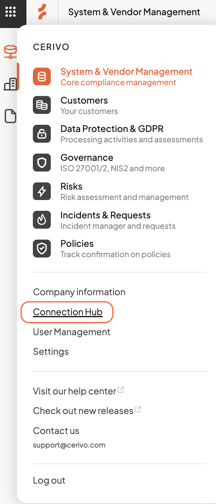
You can also create them manually by navigating to System & Vendor Management → Systems → click to add New system.
Read more about this in our step-by-step guide to mapping systems.
This helps you build your overview quickly and consistently.
Add detail to your systems
Within each system, you can document:
- what types of data are handled
- how the system is used
- how it connects to vendors, Processing Activities, or controls
This gives you a structured and connected view of your setup.
Keep your overview accurate
Your system list should reflect how your organization actually works.
Keeping it up to date ensures your setup remains reliable and useful over time.
Any questions? Contact us at support@cerivo.com!