
To understand your Processing Activities, you need a clear view of where information is stored and managed.
Mapping your systems in Cerivo helps you build that foundation.
It gives you a structured overview of:
- where data is stored
- how systems are used
- how they connect to your processes
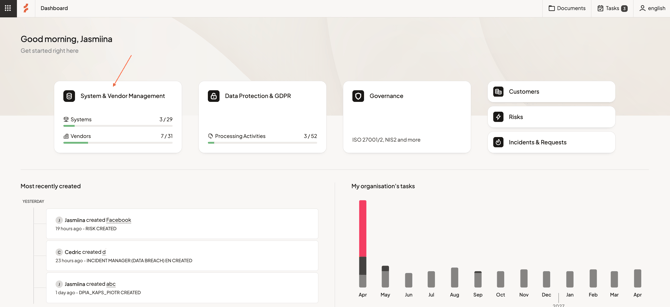
Step 1 — Go to Systems
Navigate to System & Vendor Management.
Here, you’ll see all systems currently mapped, along with their key details.
Step 2 — Add a new system
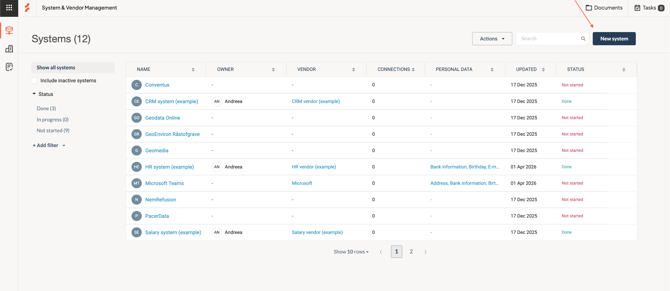
Select New system in the top right.
- Enter the system name
- If the system exists in Cerivo’s database, suggestions and known details (such as vendor) will appear
You can select Save & create new to add multiple systems in sequence.
Step 3 — Open and fill in the system's details
Open a system to access its detail page.
Here, you can add and update information to build a complete overview.
Key information to include
Focus on capturing the most relevant details:
Base information
- Status — track whether the system is mapped or still in progress
- Responsible — who owns or manages the system internally
- Vendor — who provides the system
- Data storage — where and how information is stored
Additional details (optional)
You can expand your setup with fields such as:
- system type
- criticality
- data sensitivity
- access management
- accessibility
These can be enabled and customized based on your needs.
Add context and connections
Each system should reflect how it is used in practice.
You can add:
- Description — what the system is used for
- Labels — categorize systems in a way that fits your organization
- Connections — link to other systems or integrations
- Attachments — store relevant documentation
Connect to your work
Systems in Cerivo are not standalone—they connect to your broader setup.
From the system page, you can:
- link to Processing Activities
- view or create risk assessments
- manage related tasks
This helps you build a connected and consistent overview.
Add data details
You can document:
- what types of data are handled
- which data subjects are involved
If needed, gather this information by:
- reviewing system functionality
- speaking with system owners
- checking existing documentation (e.g. agreements)
Keep your systems up to date
Your system overview should reflect how your organization actually works.
Keeping it updated ensures your data mapping, risk management, and compliance work remain accurate.
Next step
Once your systems are mapped, continue by mapping your vendors to complete your foundation.
Any questions? Contact us at support@cerivo.com!