
Welcome to the Cerivo platform!
This article is for everyone who has previously been on the Wired Relations platform and have now been moved to the Cerivo platform. We explain what is new compared to your previous platform, so that there are no surprises.
One of the major changes is of course the new platform name from Wired Relations to Cerivo. Furthermore, we have a new new hosting server OVHcloud, which is an European cloud provider with data location in the EU.
We also have a new URL: app.cerivo.com. This is where you login with your email and password or SSO setup. Read all about the different login options in this article. We recommend that you update your bookmarks and other documentation from your old Wired Relations URL to the new one on app.cerivo.com.
Multiple accounts
In case you have multiple accounts, you will need to reset your password on the first login. You will also have an extra step on the first login where you select the account you wish to enter. Once you are in, you can switch the accounts from the top menu — read more about switching accounts in this article. Cookies will remember your selection for next login.
After logging in, you will see the updated Dashboard page. For the first version of Cerivo, we have implemented the new Cerivo platform design with a goal of having a clear and consistent user experience that we can apply continuously as the platform grows further.
Check out these new elements:
- New name and logo — our new name 'Cerivo' can be seen in the URL and by clicking the 9-dot menu on the top left corner, and our new logo (the two arcs) is shown next to the menu icon. Clicking the logo will always take you back to the Dashboard page.
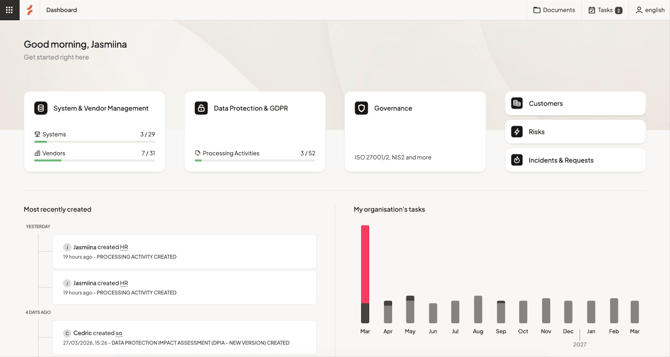
- New colors — the new brand color scheme is visualized across the platform.
- New fonts and typography — the text elements have also been updated to match the brand identity.
- Account name on the top menu — this is where you can switch accounts if you have multiple accounts.
- Buttons and icons — we have updated the design of buttons, icons, and other elements in the platform to enhance both the visual and usability experience. See for example the new designs in System & Vendor Management and Risk Management.
- New help center — you are currently in the new Cerivo help center: help.cerivo.com. It can also be accessed from the Cerivo platform via the left side menu → Visit our help center.
What is coming soon?
- Beta Contracts (add-on) — are you interested in trying out our beta Contracts feature? Contact your CSM for more details!
- Documents (add-on) — we will be introducing a new way of handling policies and procedures. Later, this will also be implemented for assessments and agreements.
- Systems & Vendors upgrade — we are working on making system and vendor management more flexible and integrated with the other parts of the platform.